Share a STEP file with someone who has no CAD
Send the STEP file as a link. The person you send it to opens it in a browser, turns the model, takes it apart, reads your notes and downloads the file. They need no CAD software and no account.
Why a STEP file is hard to share
A STEP file only opens in CAD software or a viewer. Most clients, buyers and suppliers’ sales staff have neither. So the file goes out with screenshots and a PDF beside it, and the feedback comes back as “the bit on the left”.
A link fixes both halves: they can see the model, and they can point at the part they mean.
How to share a STEP file as a link
- Drop the file at stepto.link/new. It converts in your browser, so nothing is uploaded yet.
- Mark it up. Set how the assembly explodes. Pin notes to parts: a material call-out, a tolerance, a question.
- Create the link. Sign in with Google, choose when the link expires and whether they can download the STEP file.
- Send it by email or chat, like any other link.
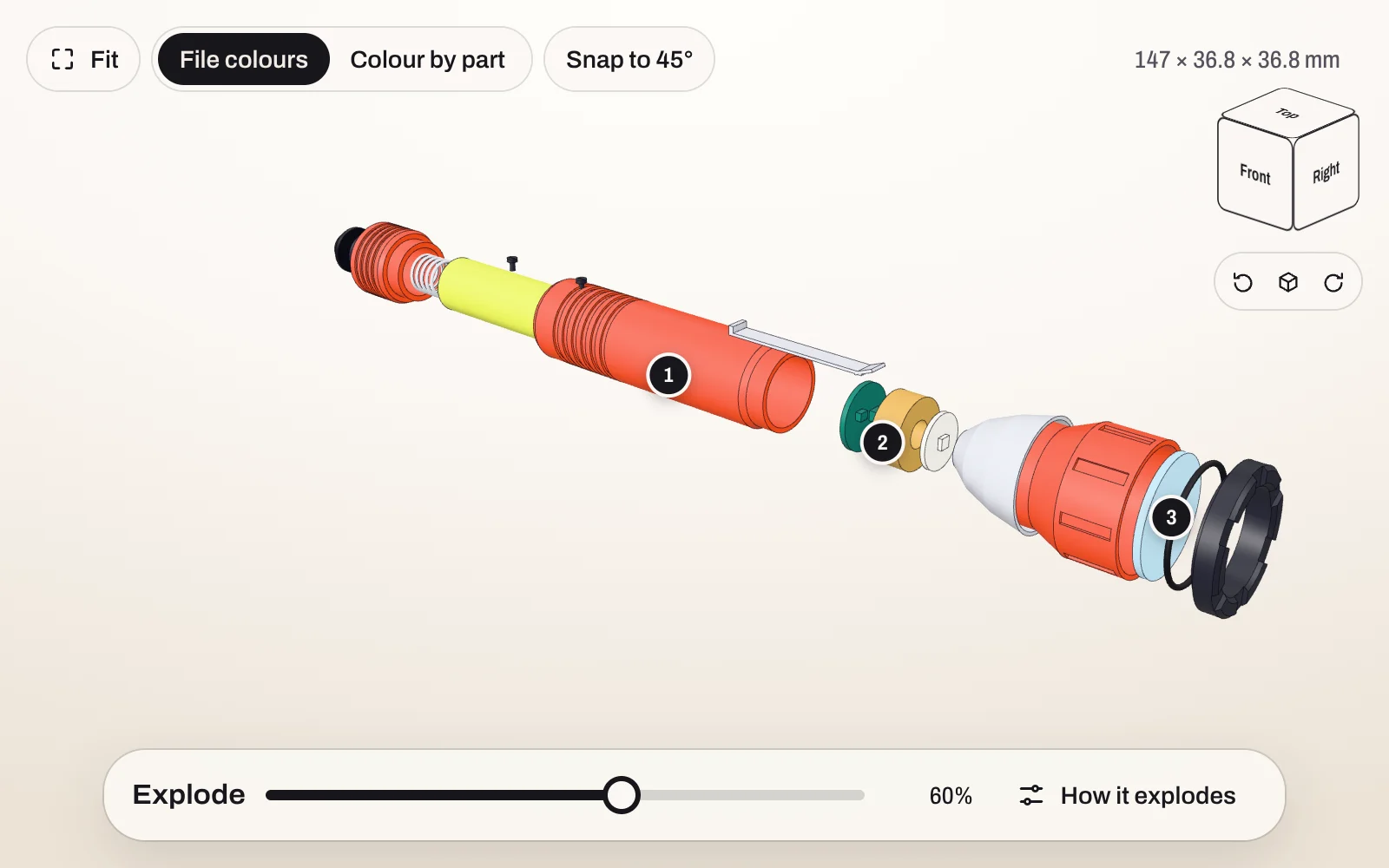
What they get
- The 3D model in their browser, on a computer or a phone.
- Your exploded view. They can move it, change it and go back to yours.
- Your notes, pinned to the parts they are about.
- The part list, with the names from your CAD file.
- The original STEP file to download, unless you made the link view-only.
Ways to send a STEP file, compared
| How you send it | Can they see the model? | Do they get the file? |
|---|---|---|
| Email attachment | Only with CAD software or a viewer | Yes, if it fits the attachment limit |
| File transfer link | Only with CAD software or a viewer | Yes |
| Screenshots or a PDF | The views you chose, and no others | No |
| Share link from your CAD system | Yes, though some ask them to sign up | Depends on the system |
| stepto.link | Yes, in any current browser, with your exploded view and notes | Yes, unless you make it view-only |
Who can open the link
Anyone who has it, so send it only to people who should see the file. A link is a long random address. It is not listed anywhere and search engines are told not to index it. When it expires, the file and its preview are deleted. You can delete a link sooner from your account. The privacy page has the detail.
Only send files you are allowed to share: a confidentiality agreement still applies to a link.
What it costs
- Free: up to 3 files at a time, 50 MB each. A link lasts up to 7 days.
- Pro, US$9 a month: up to 30 files at a time, 100 MB each. A link lasts up to 1 year.
Exploded views, notes and view-only links are included on both.
Got a STEP file?
Free to send. Your client needs no CAD software and no account.
Send a STEP fileUpdated 6 October 2026